蜻蜓伴读
LiveHarmonyOS

TTBOX

A pure native HarmonyOS smart player — one codebase adapts to phones, tablets and smart TVs. Published on Huawei AppGallery, with online playback and local caching.

How it is built

TTBOX is a smart playback client built as pure native HarmonyOS, current version v1.9.0, published on the Huawei AppGallery.

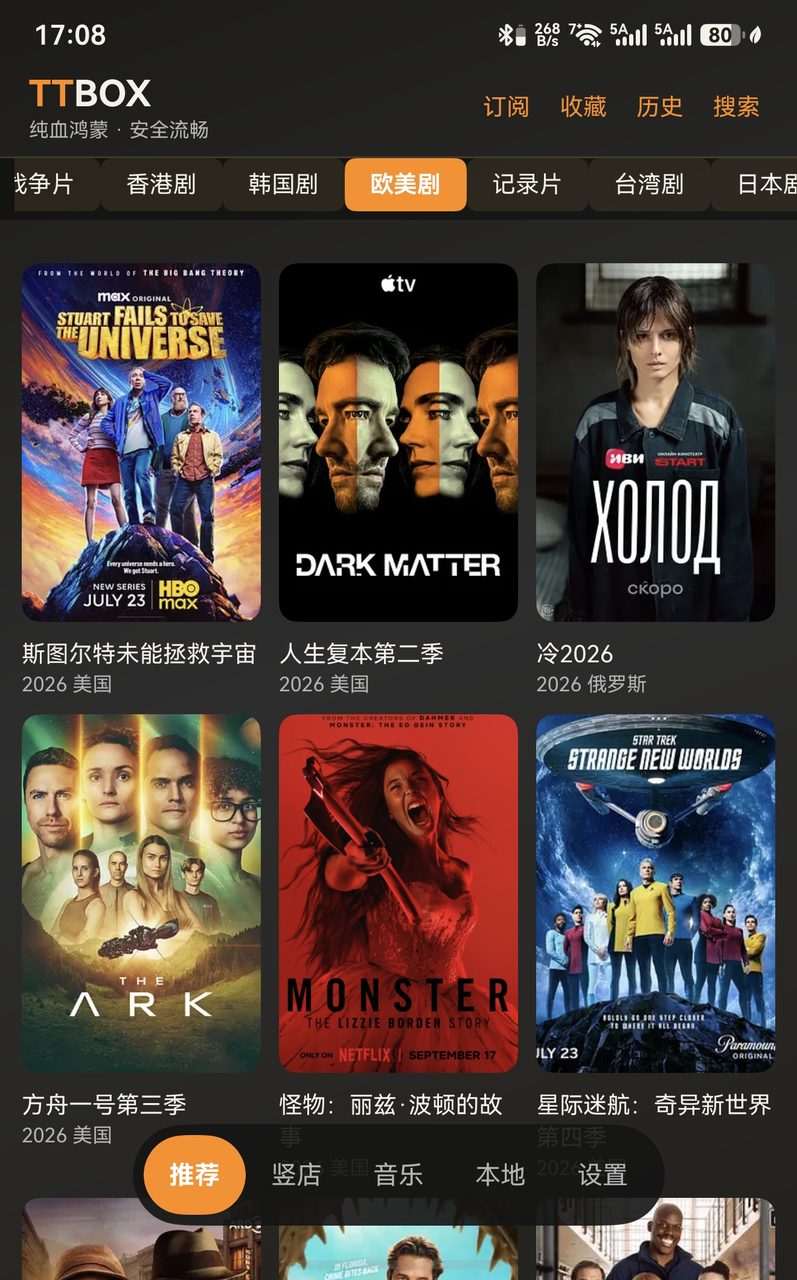
Subscription management, category navigation and a responsive recommendation grid; a source health check grades every source green, amber or red, so good ones stand out. Source packs can be exported and imported at any time, so a new device or a new version never means rebuilding from scratch.

Series tracking groups episodes as owned, watched and new, with one-tap update checks; other seasons of the same show are reminded automatically. The smart playback page gained three entry points: search, rankings and schedule.

The player is built on the native AVPlayer: long-press speed control with a speed ceiling, vertical gestures for brightness and volume, horizontal gestures to seek, audio-track switching and picture-in-picture. External subtitles in srt, ass and vtt load in portrait and fullscreen and re-attach when the episode changes. Speed and audio track are remembered across episodes.

The network-drive library plays straight from your own WebDAV or OpenList instance. DLNA casting uses SSDP discovery plus SOAP control, syncing progress, play/pause and volume to the TV. Source addresses, drives, account settings and exported data all stay on the device.

Target devices cover three form factors — phone, tablet and smart TV (2in1 / TV) — all adapted from the same ArkTS codebase.
Features

What it does

No need to open GitHub — this page spells it out.

01

Smart browsing

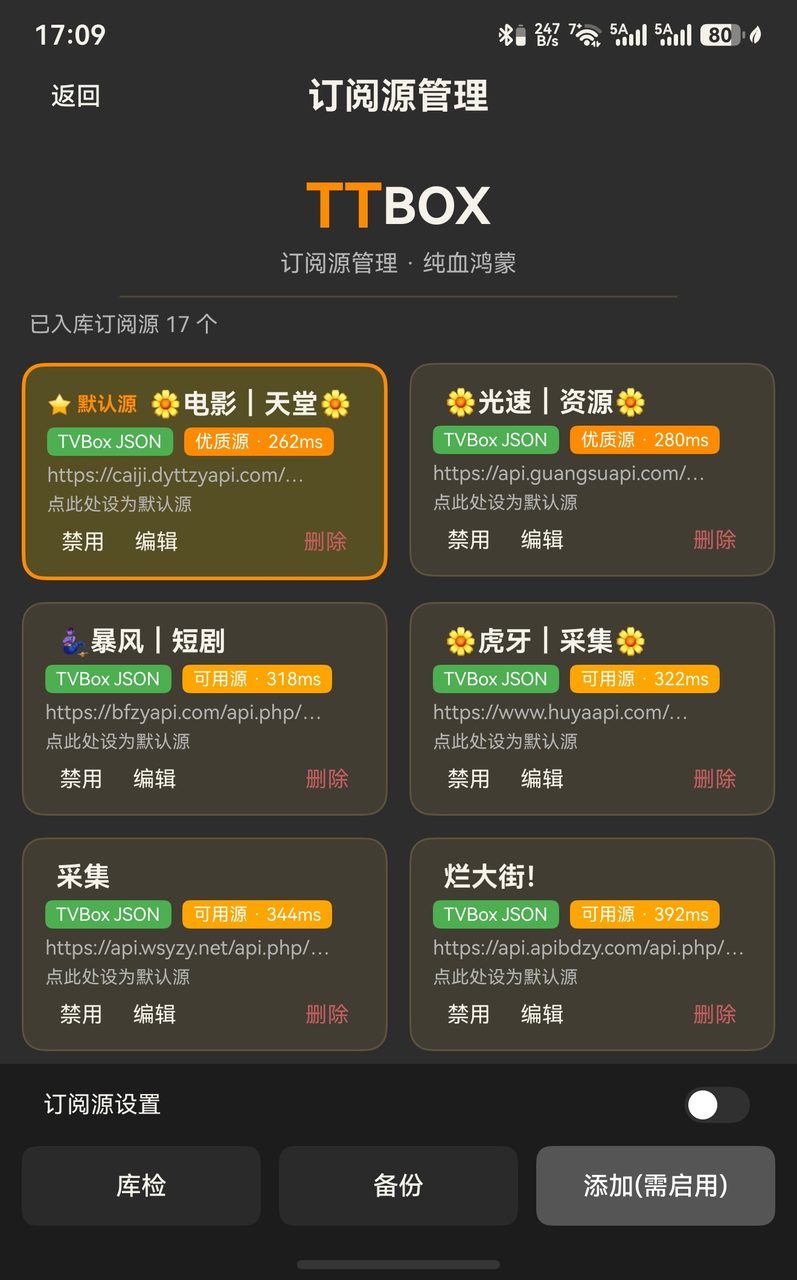
Subscription management, category navigation and a responsive grid. A source health check grades every source green, amber or red, so good ones stand out. Export and import source packs at any time — a new device or a new version never means rebuilding from scratch.

02

Switch source mid-playback

Switch between sources for the same title with one tap. Every source carries its own episode list, and playback continues from where you were instead of restarting at episode one.

03

Long-press to search

Hold a cover on the recommendation page for three seconds to search that title across sources, then pick the source yourself instead of guessing.

04

Full player

The native AVPlayer engine: speed, zoom, orientation, skip intro and outro, gesture brightness and volume, audio-track switching. Speed and track choice are remembered across episodes.

05

External subtitles

srt, ass and vtt subtitle files load in both portrait and fullscreen, and re-attach automatically when the episode changes.

06

Series tracking

Episodes are grouped as owned, watched and new, with one-tap update checks and automatic reminders for other seasons of the same show.

07

Live TV

Channel names are localised, dead channels are detected in one tap and blocked locally so they never come back.

08

Source pack management

JSON, XML and AppleCMS formats are auto-detected, then collected in bulk, de-duplicated and repaired for broken m3u8 paths.

09

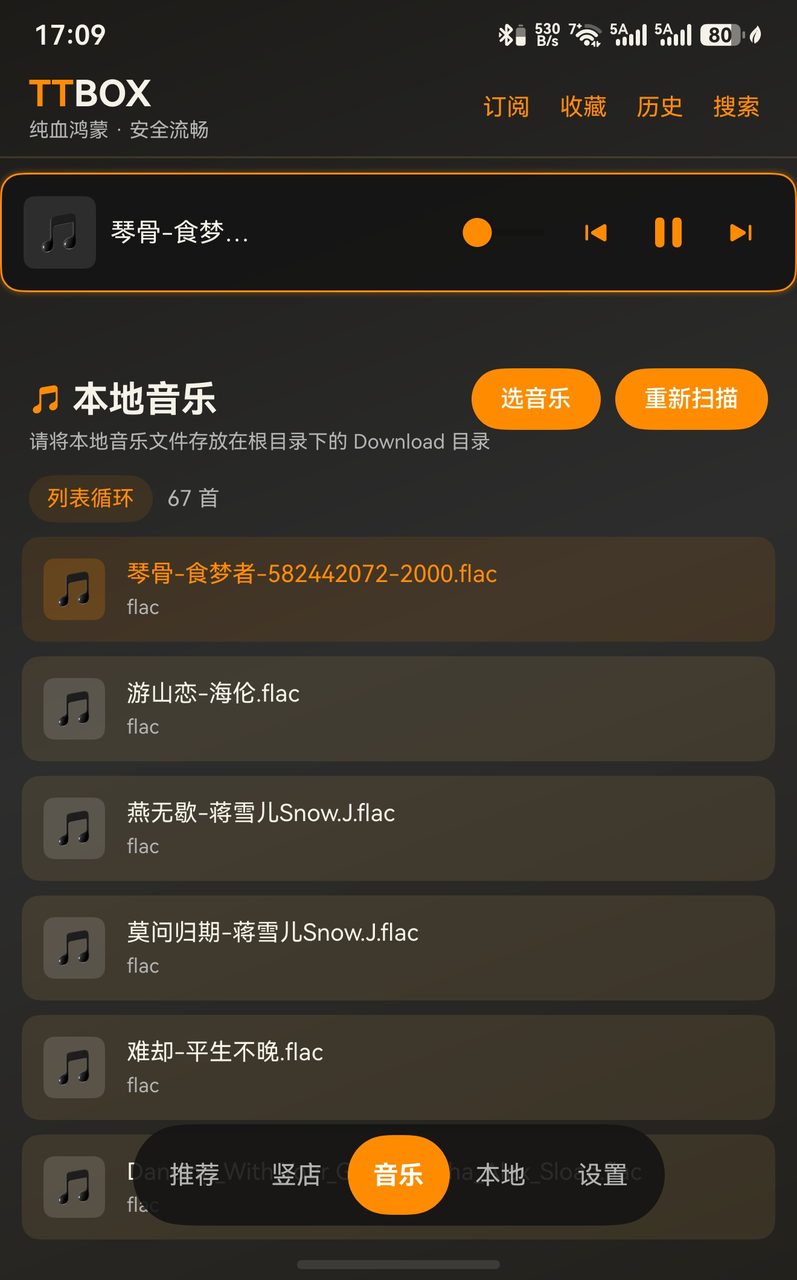
Local music

Scan and pick tracks, an immersive player, synced lyrics and embedded covers, with background playback that never stops.

10

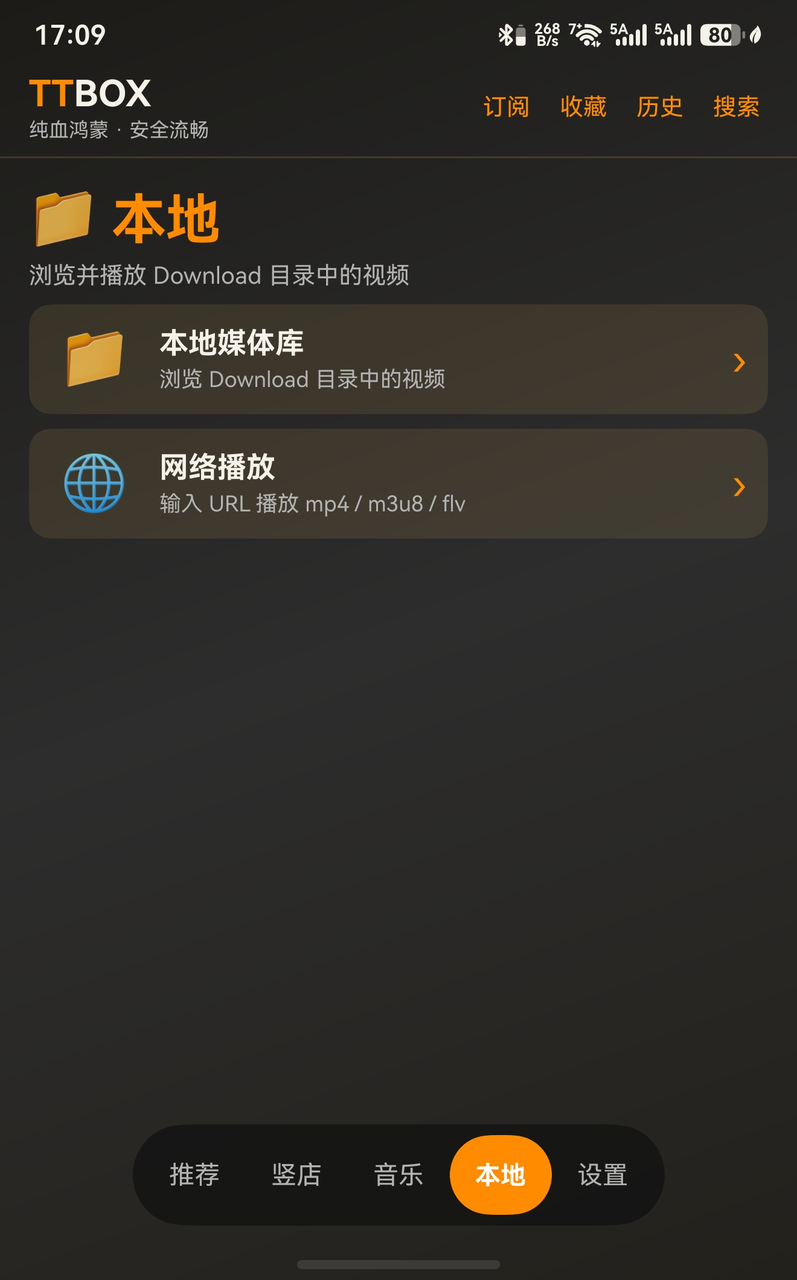
Network-drive library

Play straight from your own WebDAV or OpenList instance. Source addresses, drives, account settings and exported data all stay local.

11

DLNA casting

SSDP discovery plus SOAP control: one tap to cast in fullscreen, with the progress bar, play/pause and volume synced to the TV, and the cast state reported live.

12

Privacy by design

All data stays on the device, with a built-in privacy policy and user agreement. MIT licensed.

Screens

TTBOX in the interface

TTBOX interface screenshot 1
Home · Recommendations
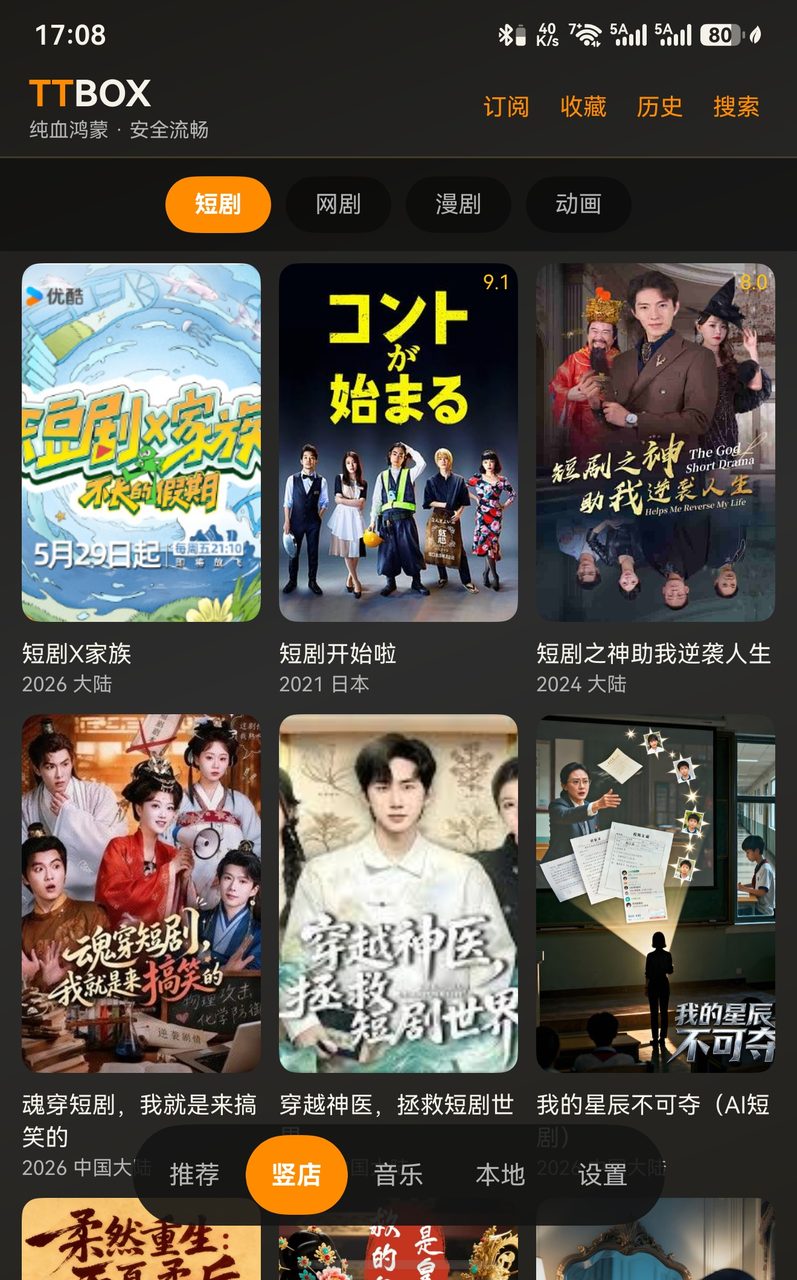
TTBOX interface screenshot 2
Portrait · Short dramas
TTBOX interface screenshot 3
Music · Player
TTBOX interface screenshot 4
Local · Media library
TTBOX interface screenshot 5
Subscriptions · Health check
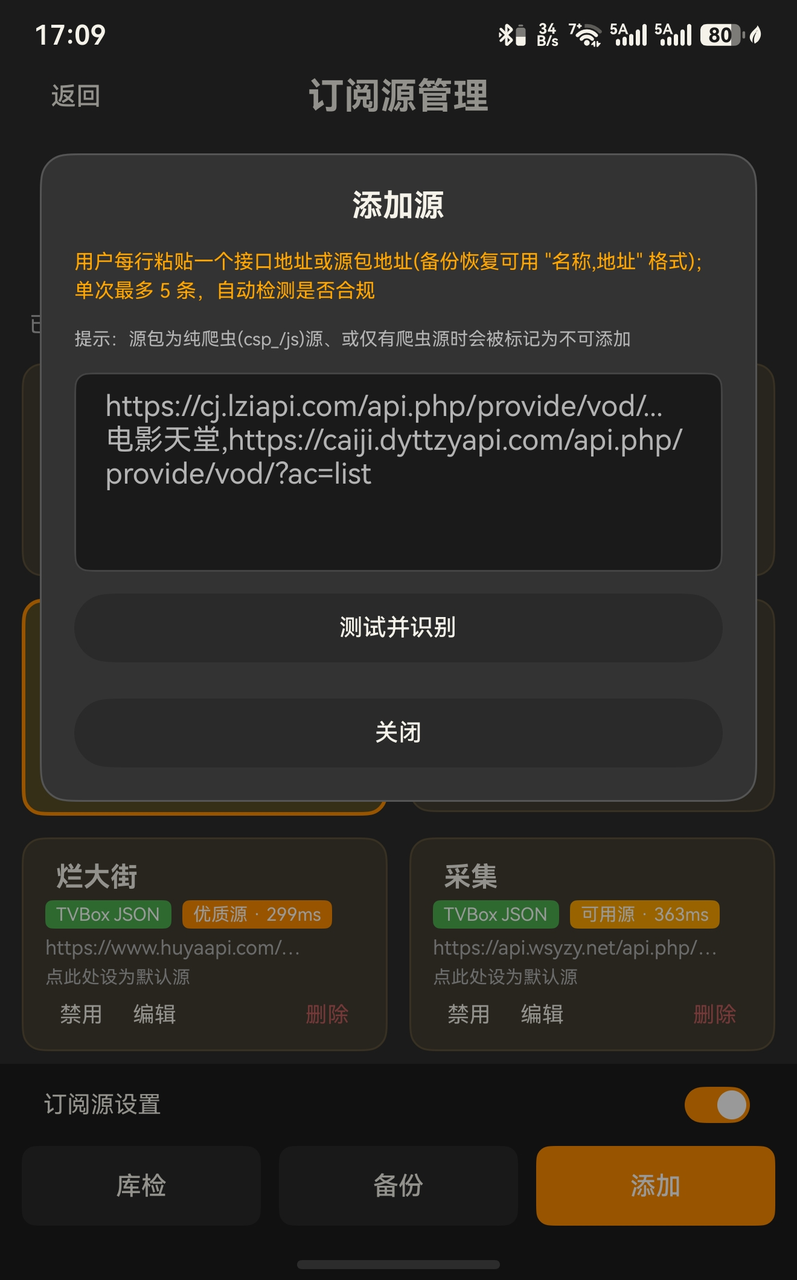
TTBOX interface screenshot 6
Add a source
Architecture

Technical architecture

Pure native HarmonyOS in ArkTS and C/C++, with no third-party player dependency.

01

EntryAbility

The app entry point; initialises SettingsBridge and CastManager.

02

AVPlayer engine

The native playback engine, with MusicPlayerService keeping music alive in the background.

03

Source engine

Source parsing, m3u8 path repair, health checks and the WebDAV proxy.

04

Cast manager

DLNA device discovery over SSDP plus SOAP cast control.

05

HttpClient

One network layer, with a configurable user agent and timeouts.

06

ConfigManager

Source persistence, pack parsing, de-duplication and network-drive cleanup.

07

Direct drive access

A WebDAV and OpenList (AList) client that talks straight to your own instance.

08

SettingsBridge

Settings changes take effect immediately — no restart needed.

Devices

One codebase, three form factors

One ArkTS codebase that keeps up with phones, tablets and smart TVs.

01

Portrait mode and gestures

Swipe up and down for brightness and volume, left and right to seek. The fullscreen control bar behaves the same in both orientations.

02

Responsive grid for large screens

Grid columns stretch on tablets and TVs, so one screen shows more entries.

03

Remote control and fullscreen

Arrow keys and OK work end to end on smart TVs — no touch needed on the big screen.

Versions

Changelog

  • v1.9.0
    Cross-source switching, external subtitles, tracking, live TV polish
    • Source switching aggregates across providers, each with its own episode list, and keeps the current episode when you switch
    • Added external subtitles (srt / ass / vtt) that re-attach on episode change
    • The library page now unifies series tracking: owned / watched / new plus reminders for other seasons
    • Long-press a recommendation cover for three seconds to search that title across sources; the detail page gained other-site sources
    • Live channel names localised; dead channels detected in one tap and blocked locally
    • Added a user service agreement; the privacy policy gained chapters on minors, third-party services and data deletion
    • Fixed: unsaved favourites, long-press search swallowed by tap, bottom nav covering content
  • v1.5.2
    DLNA casting and the settings bridge
    • Added DLNA casting (SSDP + SOAP)
    • Added SettingsBridge changes that take effect immediately
    • Fixed AList / WebDAV parsing bugs
    • Subscriptions sorted by network speed (green / amber / red)
  • v1.5.1
    Unified fullscreen bar and m3u8 fixes
    • Unified the fullscreen control bar
    • Debounced progress-bar dragging
  • v1.5.0
    Portrait mode and smart TVs
    • Portrait mode for the playback page
    • Smart TV (TV) support
  • v1.4.0
    NAS media centre
    • WebDAV / AList / SSDP device discovery
    • Emby / Jellyfin integration
Questions

FAQ

How do I add a subscription source?
On the home page open Subscription management, tap Add and paste the API URL; batch adding is supported. You can also paste a source-pack link and the usable sources are extracted for you. AppleCMS, TVBOX custom JSON, VOD, Py and M3U8 sources are all understood.
Which video formats are supported?
VOD, MP4 and HLS (m3u8) among the common ones. HLS plays through the native AVPlayer, and AES-128 encrypted streams are handled.
How do I cast to a TV?
In fullscreen, tap the cast button. DLNA devices on your network are discovered over SSDP and you cast with one tap.
Which protocols work for drives and NAS?
WebDAV and OpenList (AList), against your own private instance only. SMB and FTP are not supported yet because HarmonyOS ships no SDK for them.
How do I switch sources or add subtitles?
Switch source on the playback page lists alternatives from other providers; tapping one switches instantly and keeps that source's episode list at your current episode. For subtitles, pick Choose file under Subtitles in the portrait info panel or the fullscreen bar to load a local srt, ass or vtt file.
How do setting changes take effect?
The SettingsBridge pushes the change straight to the player and network layer — no restart needed.
Does TTBOX ship any video content?
TTBOX ships, presets, provides, recommends and distributes no video resources, video content, streaming links, API addresses or third-party site addresses. It is a purely local playback tool: all content comes from third-party subscription sources you add yourself, and TTBOX takes no responsibility for their legality, accuracy or completeness.
Legal

Disclaimer

  1. TTBOX is a video player that runs entirely on your own device. It ships, presets, provides, recommends and distributes no video resources, video content, streaming links, API addresses or third-party site addresses.
  2. Subscription interfaces added through TTBOX (JSON, API, web addresses) are obtained and managed by the user. TTBOX only offers parsing and playback, and takes no responsibility for the legality, copyright ownership, accuracy or safety of the source content.
  3. This page exists to demonstrate the software's features. Screenshots, mock-ups and feature descriptions shown here are for presentation only and do not represent the final feature set; any third-party content appearing in the screenshots is for demonstration purposes and is unrelated to TTBOX.
  4. When using TTBOX, judge and ensure the legality of the sources you add, and respect the law and third-party intellectual property rights. Any legal dispute, copyright claim or economic loss caused by source content you added yourself is yours to bear, and has nothing to do with the TTBOX authors.
  5. TTBOX strictly observes the Cybersecurity Law and the Copyright Law of the People's Republic of China and related regulations. If you find non-compliant content, contact mt@ttread.cn and it will be handled promptly.